
Essay · 3. Oktober 2026 · Adrian Verdan
I Gave a Picture a Play Button

Dieser Artikel liegt im englischen Original vor. Die Fassung auf Medium ist veröffentlicht. Dieselbe Fassung bei Medium →
With Codex, I made a picture choose sixteen notes. The first version made me scroll twice to find the player. Here is how the experiment became a tool—and how to build a version of your own.
Drafted with AI assistance; however, every number, failure, and opinion in here is mine
The first version filled my screen with an enormous heading and a mountain scene. The Play button was two scrolls away.
I had asked for an instrument. Its first introduction was a poster.
The program already did the interesting part: a selected image row supplied sixteen notes. Moving it changed which pixels supplied them, but the opening screen kept their controls out of reach.
I built this experiment on 2 October 2026 with Codex, an AI coding agent that writes and changes program files. I wanted to choose which part of the picture would supply the notes, then follow the change from colour to sound. Asking the AI to write a soundtrack would have handed over the part that interested me.
The mountains were the material. The rule was mine to choose.
Put a handle on the idea
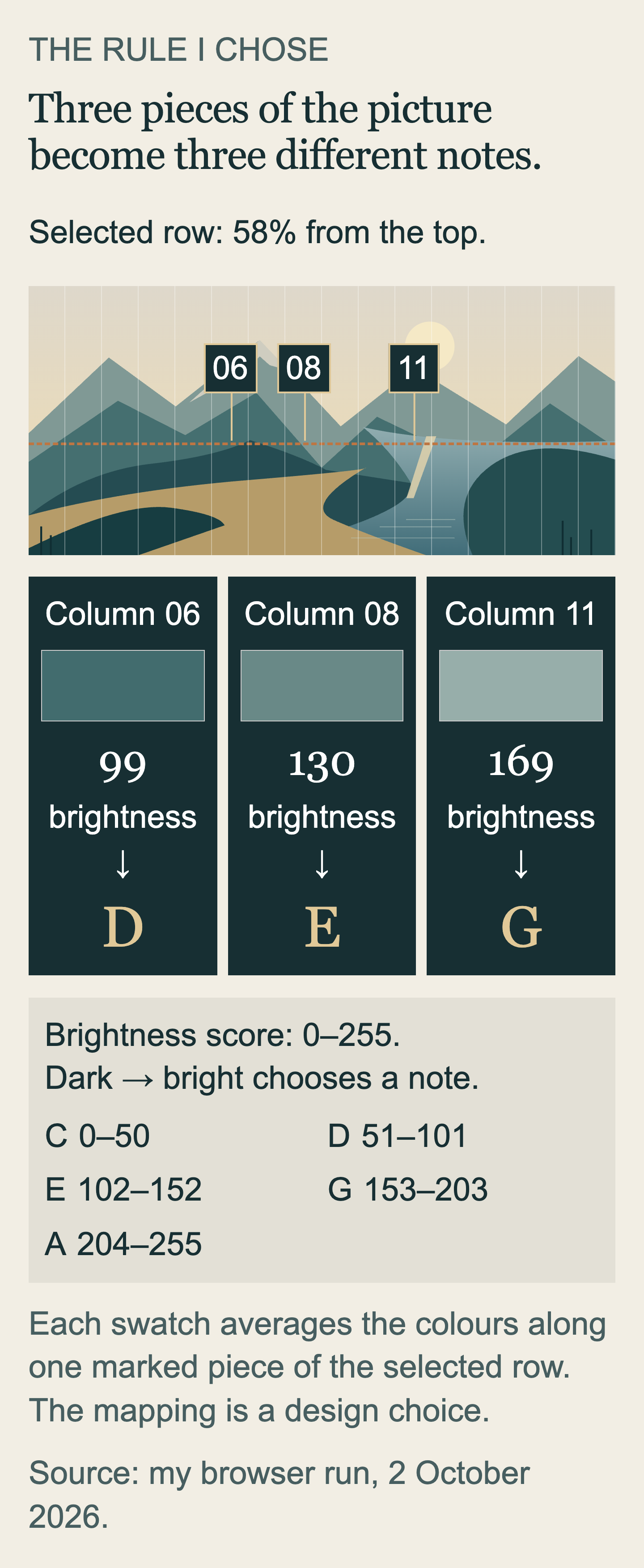
I specified the rule: split the image into sixteen equal-width columns, let me select a horizontal row, and use the brightness in each column to select C, D, E, G or A. Codex drew the illustration and wrote the program that carried out that instruction.
This is the C major pentatonic set: five notes, leaving out F and B. C is the lowest available here and A the highest. Darker areas select lower notes; lighter areas select higher ones. A horizontal line marks the selected row. A separate vertical marker moves across the columns during playback, keeping your place in the sequence.
Try my public picture player before building. It needs no AI account. Keep your device volume low, move the slider beneath the image to 58% and press Play 16 notes. The marker moves from left to right and the note buttons show the current step. Move the slider to 35% and press Play again. You have changed the material the rule reads. If the notes differ from the printed sequences below, restore the example image and check the selected row before comparing again.
Zum Vergrößern antippen.
The sound generator makes short sine-wave tones: single-frequency signals that fade over 180 milliseconds, or 0.18 seconds. It starts after a deliberate Play or note-button press. Stop ends the sequence, Mute leaves the visual pattern available, and Tempo changes how fast the steps play. During playback, the browser runs the program Codex wrote.
I used an illustration so everyone could begin with the same input and return to it. Its pale sky, dark mountain layers and light path make different rows worth comparing.
Follow one colour all the way through
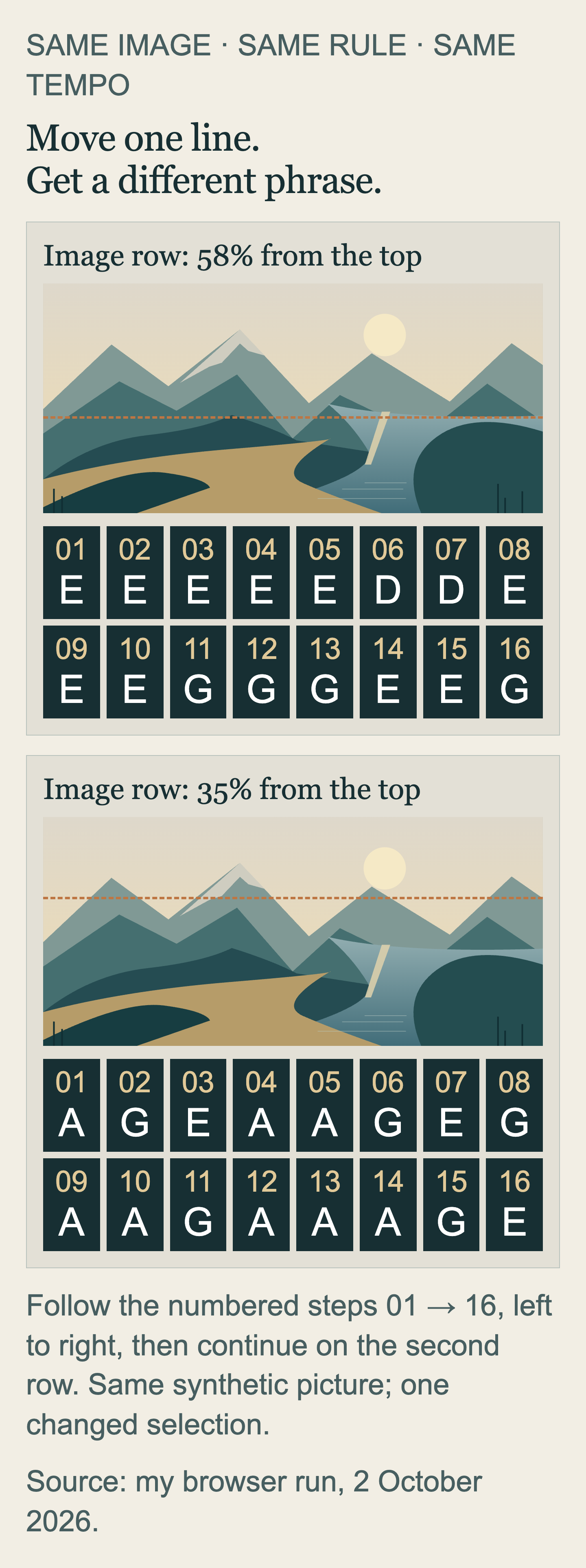
With the original illustration at 58% down from the top, the instrument produced:
E E E E E D D E E E G G G E E GAt 35%, higher in the same picture, it produced:
A G E A A G E G A A G A A A G EThe lower row has five changes between neighbouring notes; the higher row has eleven, across the same fifteen transitions. I prefer 35% for this experiment's visible variation. More steps differ from their neighbours, giving me more places to follow a change.
The rule estimates brightness from stored red, green and blue colour values, each on a 0–255 scale. You can trace the first note. At 58%, its average red, green and blue values, rounded to whole numbers, were 115, 144 and 141. The program calculates round(0.2126 × 115 + 0.7152 × 144 + 0.0722 × 141) = 138. These weights match the W3C colour coefficients, giving green the largest contribution. That standard first transforms colour values; this player uses stored values directly as an estimate. Round means the nearest whole number.
The score runs from 0 for black to 255 for white. The consecutive ranges are C: 0–50, D: 51–101, E: 102–152, G: 153–203, A: 204–255. So 138 selects E. At 35%, the first score is 219, which selects A. See every sample in my public player opens the actual colour values, brightness and note for all sixteen columns.
Zum Vergrößern antippen.
The rule is deliberately invented. A dark mountain has no obligation to select a low note. I could reverse the mapping, or use colour instead of brightness. Five notes keep the choices small enough to follow; the resulting pattern may appeal or become tedious. Random numbers could select the same notes, too. Here each choice has an address in the picture. The mountain gets a say through its pixels; it does not get to write the liner notes.
Bring the player upstairs
My first build had working calculations and an unhelpful entrance. A working Play button has limited charm while it is living downstairs.
I asked for a compact heading, Play and Stop above the picture, and the whole image visible. The second version brought the player within reach. The notes were still below the image, while the desktop had unused space beside it.
My next instruction put the image and row control on the left, all sixteen notes on the right, and the player above both. The third version let me move the selected row and follow its result without looking away from the picture. On a narrow screen the page stacks those parts vertically; the side-by-side arrangement belongs to the desktop view.
The image and note calculations stayed unchanged across these layout revisions.
“Make it more impressive” would have given the enormous heading another chance. Naming what needed to remain in view gave the agent a job I could judge as soon as it opened the page.
On 26 August 2026, I found that book-diagram corrections I had marked done were still missing from the finished book. This time I opened the delivered page before calling the revision useful.
The frame had a part too
I then selected the illustration from my own website's homepage: a dark working area on the left, a laptop and papers on the right. The local image picker fitted this taller picture into the player's wide frame and added pale strips at the sides.
At both 58% and 35%, the first two notes and the last two were A. The strips had brightness 218, inside the highest note's range. Changing the selected row changed the picture's contribution, while those four edge notes remained. Even the frame had been assigned a part.
I wanted the whole image available, but I also wanted to choose whether the padding entered the sequence. My next request was specific:
Add Fit image and Fill frame (crop). Keep Fit as the default. Fill should crop the image centrally without stretching it, and visibly mark that a crop is active.
Fill enlarged the image without stretching it, cropping the top and bottom. At 58%, the first column now read brightness 17 and selected C, where Fit had given 218 and A. I chose Fill for this homepage illustration because I wanted the rule to read the image. Fit remains available when keeping the whole picture matters more. The choice has a cost: part of the image leaves the frame.
My public player also accepts a non-private PNG or JPEG, common picture-file types. Its picker opens the image from your device, without putting it into an AI conversation. After the page loaded, I recorded the browser’s network events during a JPEG import: no outgoing web request appeared. I also checked localStorage and sessionStorage, two browser stores that pages can use to retain data. Both were empty. A row through a recognisable feature gives the comparison a starting point; moving just above it changes which pixels enter the sequence. Fit and Fill let you decide whether the whole image or the occupied frame matters more. Restoring the example returns to the shared illustration.
Give Codex a place to build
In my local Codex project, the agent wrote the files, started the preview and opened the browser result. Source and page stayed available together during revisions.
The corresponding desktop-app route starts with installation on macOS, Windows or Linux and signing in with a ChatGPT account. As of 2 October, Codex desktop access on the Free and Go subscription plans is subject to rollout, and account limits apply. Codex must be available as an app mode before this build can begin. My public player remains usable without an AI account.
An empty folder called picture-instrument gives Codex a place for the new files. In the desktop app, choose Codex, open that folder as the project location and start New chat; the quickstart covers the app steps. That keeps source and result together, as my local project did.
The request includes the revised layout and Fit/Fill. Darker pixels can select lower notes, as mine do, or higher ones. For the latter, reverse the five note assignments while keeping the brightness ranges. That choice changes the rule before the agent writes it.
C4 means middle C; the other four notes are higher, within the same octave: the interval from one C to the next. This is a condensed build request:
Build a working picture instrument in this project folder.
Draw an original example image in code: pale sky, dark mountains, a light path.
Let me select a horizontal image row with a slider.
Split the image into sixteen equal-width columns.
In each column, average the row's red, green and blue values and round them.
Brightness = round(0.2126*red + 0.7152*green + 0.0722*blue).
Map brightness 0–50 to C4, 51–101 to D4, 102–152 to E4,
153–203 to G4 and 204–255 to A4.
On a wide screen, put the full picture and row slider on the left and all sixteen notes on the right; stack them on narrow screens.
Put Play 16 notes, Stop, Mute and Tempo above them.
Play short, low-volume sine-wave tones only after a button press.
Show a moving playback marker and each column's colour, brightness and note.
Add buttons that load solid black and solid white test images,
and a button to restore the example image.
Let me select a local PNG/JPEG image, processed only in this browser.
Add Fit image and Fill frame (crop). Fit is the default.
Fill crops centrally without stretching. Clearly show when cropping is active.
Do not transmit or save selected images. No accounts or external services.
Keep all program files in this folder. Test the mapping and Play/Stop.
Confirm that selected images stay in the browser and explain how you checked.
Start a local browser preview, open it, and explain how to reopen it later.
The expected result is an opened local preview: a page supplied by a program on your computer, with the picture, row slider, notes and player. If it reports completion without showing a page, say: “Start the preview and open the working instrument. I need to operate it.” An approval request asks permission for a proposed action; an unclear one needs an explanation before proceeding.
The recorded sequences belong to my public player's illustration; a newly generated picture may differ. In the original mapping, the black-image button should give sixteen C notes and the white-image button sixteen A notes. With the reversed mapping, expect sixteen A notes from black and sixteen C notes from white. Press Play, then Stop partway through: both marker and tones should stop. For any column with brightness 102–152, expect E under either mapping. This also checks a middle range.
The folder holds the built version. To reopen it through Codex: open that folder and say, “Start the existing local preview and open it; do not rebuild or change files.” A local server (the program supplying the page) must stay running. This own-project route still uses the agent; a bookmark opens my public player without it. Copying the whole folder to picture-instrument-working preserves the current version before a larger revision.
The part I want to keep
My fingerprint on this experiment is the row-to-note rule, the five-note vocabulary and the arrangement that keeps the picture beside its result. The agent handled implementation. When the player ended up below the opening screen, my next contribution was considerably less mysterious than a better prompt technique: move it where I can use it.
If your picture ends up playable but the player is two scrolls away, you already know what to say.
Further reading: my free AI Starter: From Chat to Your Own Tool, which includes a labelled Claude advertisement link alongside a direct provider link.
